Paper Cup Wrapper Template Bundle: 6 Sizes for Every Need
Imagine you're preparing for a pop-up coffee stand, a birthday party, or launching your own small-batch beverage brand. You've got the cups, the drinks, and the enthusiasm, but something's missing—the professional, cohesive look that makes customers pause and take notice. That's where a solid set of design assets comes in. The Paper Cup Wrapper Template Bundle isn't just another digital download; it's a practical toolkit for creating polished, customized cup wraps without starting from scratch.
What Exactly Is This Template Bundle?
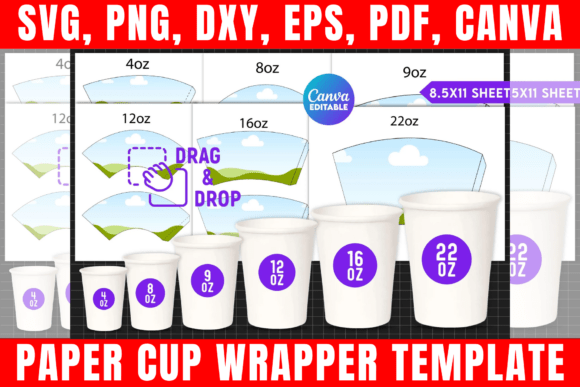
At its core, this bundle provides six different sizes of cup wrapper templates, designed to fit everything from standard paper coffee cups to styrofoam party cups. You receive editable files in formats like SVG, PNG, DXF, and PDF, plus an editable Canva template link. This means whether you're using Cricut Design Space, Silhouette Studio, Adobe Photoshop, or even just Canva for quick edits, you have a compatible starting point. The templates are built to fit a standard 8.5"x11" page, making home or office printing straightforward.
Visually, the templates offer a clean, versatile base. Think of them as a blank canvas with pre-set dimensions and bleed areas. The style is intentionally neutral, allowing you to impose your own brand personality—whether that's minimalist and modern, rustic and handwritten, or bold and graphic. The appeal lies in their flexibility. They don't scream a particular trend; instead, they provide structure for your own creative expression, which is far more valuable for long-term brand consistency.
Where Do These Templates Shine?
The real-world applications are surprisingly broad. For small business owners, these templates are a game-changer for creating branded coffee cup sleeves. Consistent packaging reinforces brand identity, and with six sizes, you can ensure a snug fit for various cup models, which elevates perceived professionalism. Imagine your logo, tagline, and contact info wrapping seamlessly around a cup—it's subtle, effective marketing that customers carry with them.
For event planners and crafters, the bundle simplifies creating themed party supplies. A birthday party, wedding shower, or corporate event can have customized cup wraps that match invitations and decor. The editable Canva template is particularly useful here; it allows for quick drag-and-drop customization without advanced software knowledge. You can change colors, add text, and upload graphics in minutes, which is perfect for last-minute adjustments or multiple event themes.
Print-on-demand entrepreneurs and designers will find value in the included SVG and DXF files. These are ready for cutting machines, allowing for precise, professional cuts of vinyl or cardstock wraps. This opens doors for selling physical, customized cup sleeves as a product line. The commercial usage terms are clear: you can use the templates to create and sell physical items, which is a critical detail for anyone building a side hustle or small business.
Making It Work: Practical Guidance for Your Project
Choosing the right template from the bundle is your first step. Consider your cup's dimensions first—measure carefully. The six sizes likely cover common options, but matching the template to your actual cup prevents waste and ensures a clean look. Next, think about your project's context. A sleeve for a coffee shop might need space for a logo, social media handle, and a simple pattern. A sleeve for a wedding favor might prioritize elegant typography and a monogram.
When customizing, remember that less is often more. The template's strength is its clean lines, so avoid cluttering it with too many fonts or graphics. Stick to one or two complementary typefaces—a bold sans-serif for headlines and a readable serif or script for details. This maintains visual hierarchy and ensures your message is legible even at a glance. If you're using the Canva template, take advantage of its font library, but always check the licensing for commercial use if you plan to sell the final product.
Testing is non-negotiable. Print a test sheet on regular paper before using your final material. Check for alignment, color accuracy, and how the wrap fits around the cup. Does the text wrap smoothly? Is the graphic element positioned correctly? This step saves time, money, and frustration. For Cricut or Silhouette users, do a test cut on scrap material to calibrate your blade pressure and depth for your chosen cardstock or vinyl.
Finally, think about the material you'll print on. A matte cardstock feels rustic and premium, while a glossy finish might suit a modern, vibrant design. The PDF files with solid white backgrounds are ideal for printing on colored or patterned paper, as the white will block out the background, ensuring your design pops. The SVG files with transparent backgrounds are perfect for digital use or cutting where you want the cup's color to show through.
This Paper Cup Wrapper Template Bundle is less about flashy design and more about providing a reliable, adaptable foundation. It's a practical asset that bridges the gap between a great idea and a professional, tangible result. By focusing on fit, context, and thoughtful customization, you can leverage it to enhance your branding, streamline your event prep, or even build a new product line. The value isn't just in the files you download, but in the polished, consistent creations you produce with them.