Showcase Your Art Like a Pro with a Wall Gallery Mockup Pack
As a designer or creative entrepreneur, you know that a single image can tell a story, but a curated collection can build a brand. Imagine presenting not just one piece of your artwork, but an entire series, a mood, or a complete product line in a single, stunning visual. This is the power of a well-executed gallery wall, and achieving it digitally is now incredibly straightforward. The Multiple Frame Wall Gallery Mockup Pack is a comprehensive toolkit designed to transform how you present your work, moving beyond single-item displays to create immersive, professional environments that captivate your audience.
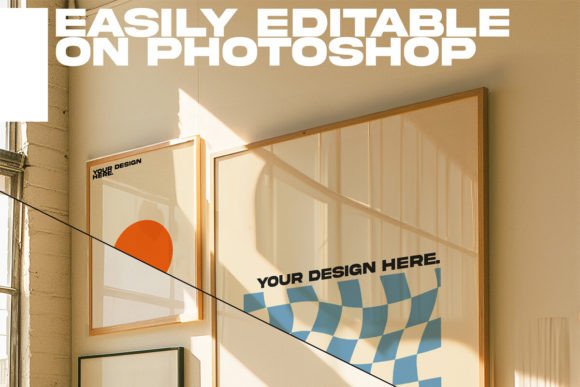
This isn't just another set of templates. It's a curated collection of 20 distinct interior scenes, each designed with a clean, mid-century modern aesthetic that feels both timeless and contemporary. The settings are intentionally simple, avoiding distracting decor so your art remains the absolute focus. What brings these scenes to life are the subtle, natural sunlight effects—soft glows and gentle shadows that add depth and realism to every frame. The pack offers a mix of free-standing art frames and classic wall-hung galleries, giving you the flexibility to match the presentation to the style of your work, whether it's a bold graphic print or a delicate watercolor series.
Where This Mockup Pack Truly Shines
Think about your portfolio. Instead of a grid of isolated images, you can now create a single hero shot that showcases a cohesive collection. For an interior designer or a photographer, this means displaying a series of prints from a single shoot in a realistic living room setting, instantly conveying the mood and scale to potential clients. For an illustrator or a graphic designer selling prints online, it allows you to present a themed series—say, botanical illustrations or abstract patterns—as a complete, desirable set. This approach doesn't just show your work; it sells a vision of how that work can transform a space.
The applications extend far beyond a traditional portfolio. For social media managers and content creators, these mockups are a goldmine. You can create a month's worth of Instagram posts or Pinterest pins from a single template, simply by swapping out the artwork in the frames. This ensures visual consistency across your feed while dramatically cutting down on production time. For e-commerce store owners, particularly on platforms like Etsy or Shopify, using these mockups for product listings can significantly increase perceived value. A customer seeing a print displayed beautifully in a styled room is more likely to imagine it in their own home, which can directly influence purchasing decisions.
Integrating Mockups into Your Design and Brand Workflow
Using the Multiple Frame Wall Gallery Mockup Pack effectively is about more than just drag-and-drop. It's a strategic tool for strengthening your brand identity. The consistent mid-century modern style of the interiors can become part of your visual language, signaling a certain aesthetic to your audience. This consistency in presentation builds recognition and professionalism, whether you're a blogger creating featured images or a small business owner crafting social media graphics.
From a practical design standpoint, these files are built for ease of use. The included PSD files for Adobe Photoshop are layered intelligently, allowing you to place your artwork into designated smart objects with just a few clicks. The A4 size is versatile for both digital use and high-quality printing for physical portfolios or lookbooks. The included JPG previews offer a quick way to browse your options, and the instructions ensure even those less familiar with Photoshop can get started quickly. When considering font pairing for any text overlays—like your name, a series title, or a call-to-action—the clean interiors provide a perfect neutral backdrop. A simple sans serif font often complements the modern aesthetic, maintaining readability without competing with your art.
Practical Guidance for Selecting and Using Your Mockups
With 20 templates, you have a rich library at your disposal. The key is to choose scenes that complement, not overwhelm, your artwork. For bold, colorful pieces, a simpler room with neutral walls might be best. For more subtle or monochromatic work, a scene with a bit more texture or a contrasting wall color could make it pop. Always pay attention to the lighting in the mockup—does the direction of the sunlight in the scene align with the implied light source in your artwork? This small detail makes a huge difference in realism.
Before finalizing, always test your chosen mockup with a few different pieces from your collection. See how the scale of the frames works with your compositions. Does a detailed illustration get lost in a large frame, or does a minimalist graphic command the right amount of space? The goal is to create a harmonious visual flow across the gallery wall. Remember, the mockup is the stage, and your art is the performance. The right design assets should elevate, not distract. This pack is designed to be a versatile part of your creative toolkit, helping you communicate the quality and context of your work more effectively than a flat digital file ever could. It's about giving your audience a richer experience and, ultimately, helping you connect with them on a deeper level through professional, thoughtful presentation.